
Best Online Stores to Buy Genuine Apple Products in Pakistan
Finding genuine Apple products in Pakistan is not as straightforward as it should be. Counterfeit iPhones, fake AirPods, uncertified chargers, and — most commonly — repacked products are widespread across both physical markets and online platforms. This guide helps Pakistani buyers purchase Apple products safely, verify authenticity before paying, and choose the right seller.
The Biggest Risk Most Buyers Ignore — Repacked Products
Most buyers worry about outright fakes. The more common problem in Pakistan is repacking — where a used, refurbished, or lower-spec device is placed inside a genuine original box and sold as brand new.
Repacked products pass a visual inspection easily. The box looks genuine. The seal looks intact. The accessories look original. But the device inside is not what the box says.
How to protect yourself:
The serial number printed on the box must exactly match the serial number shown inside the device settings. These are two separate numbers from two separate sources — and they must be identical.
- On iPhone: Settings → General → About → Serial Number
- On iPad: Settings → General → About → Serial Number
- On Mac: Apple menu → About This Mac → Serial Number
- On AirPods: Settings → Bluetooth → tap the i next to your AirPods → scroll to find serial number
- On Apple USB-C EarPods: the serial number is printed on the cable near the USB-C connector
Check this before you open the accessories. Before you power on the device. The moment the box is opened in front of you, compare these two numbers immediately.
Serial Number Verification — Product by Product
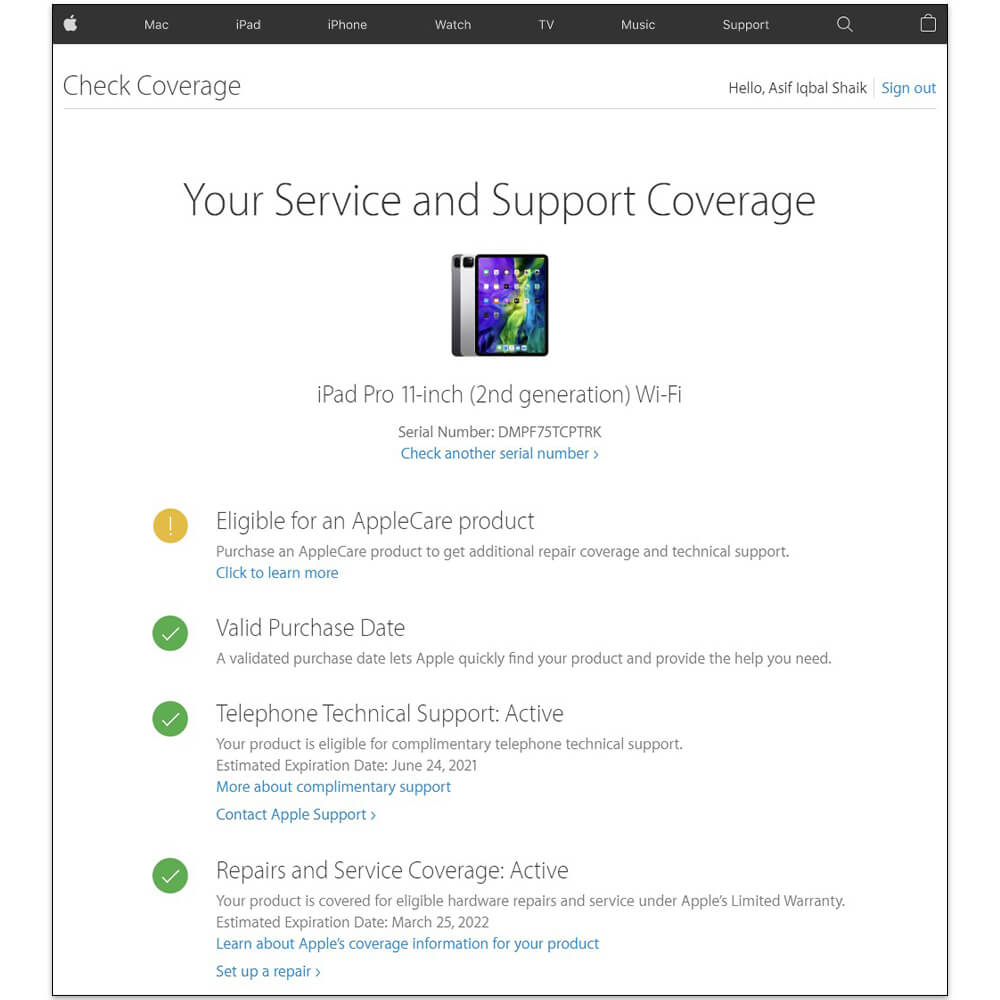
Apple provides an official coverage check tool at checkcoverage.apple.com. Enter the serial number and Apple’s system will confirm whether the device is genuine, its purchase date, and warranty status.
- iPhone — Always verify. Enter the serial number on Apple’s coverage page. A genuine new iPhone will show as purchased recently with active warranty. A repacked or used device will show an older purchase date or expired warranty.
- iPad — Same process. Serial number on box must match Settings → General → About. Verify on Apple’s coverage page.
- Mac — Serial number is on the bottom of the device and in About This Mac. Verify on Apple’s coverage page. Also check that the MacBook’s specs shown in About This Mac match exactly what was advertised — RAM, storage, and chip model.
- AirPods — Serial number is inside the lid of the charging case and also accessible through iPhone Bluetooth settings once paired. Verify on Apple’s coverage page. Fake AirPods will not appear on Apple’s system at all.
- Apple USB-C EarPods — Serial number is on the cable. Verify on Apple’s coverage page.
- Apple accessories (cases, cables, chargers, MagSafe, screen protectors) — These do not have individual serial number verification through Apple’s system. For these products, buy only from verified sellers with purchase documentation. Check for MFi certification marking on cables and chargers.
What to Check on the Box Before Buying
Regardless of which Apple product you are purchasing, check these things before completing any payment:
- Box condition — The original Apple seal is a single thin film wrap. Any tape, resticking, or double-sealing indicates the box has been opened.
- Box serial vs device serial — As described above, these must match exactly. No exceptions.
- Regional indicators — The box will show the country of distribution. A/A model numbers indicate international/UAE stock. LL/A indicates US stock. PK or ZA may indicate Pakistan or South Africa regional stock. Know what you are buying and confirm the warranty region before paying.
- Charger and cable in box — Confirm the accessories inside the box match the regional specification. A Pakistan-sold iPhone should include a USB-C cable. Absence of expected accessories is a repacking signal.
Where to Buy Genuine Apple Products in Pakistan
Apple Mart Pakistan — Our store stocks genuine Apple products with clear regional documentation. Every purchase comes with an IMEI-linked receipt. We specify stock origin on each product listing so buyers know exactly what warranty coverage they are receiving. We encourage every buyer to perform serial verification before and after receiving their order — and our team is available to guide this process for first-time Apple buyers.
Apple Store Pakistan— Another verified option for Apple buyers in Pakistan. Their listings include stock origin information and warranty documentation, making them a useful reference when comparing Apple product availability and pricing across platforms.
For any Apple purchase in Pakistan — regardless of which verified seller you choose — perform the serial number check, verify the box seal, and confirm regional stock origin before payment. These three steps take less than five minutes and protect a purchase worth tens of thousands of rupees.
